Terraform state is the record that connects configuration to real infrastructure. When two pipelines modify the same state at once, the problem is not theoretical: one plan can overwrite another, lose outputs, or leave the environment partially understood.
What locking protects
Locking serializes operations against one state object. It does not make a bad plan safe, repair drift, or replace code review. It creates a small but essential invariant: one writer at a time.
The incident
The warning sign was an apply that had been running for far too long. A second pipeline started from the same pull request, reported that the state was locked, and was retried by an eager operator. The first runner had already died, but nobody had confirmed whether its cloud request was still in flight.
We stopped treating the lock message as a nuisance. We checked the CI run, the state object, and the cloud audit trail. The lock was stale, but the investigation mattered because removing a live lock would have allowed two writers to continue against the same environment.
terraform {
  backend "s3" {
    bucket         = "platform-state"
    key            = "prod/network/terraform.tfstate"
    region         = "eu-west-1"
    encrypt        = true
    use_lockfile   = true
  }
}
Recover from a stale lock carefully
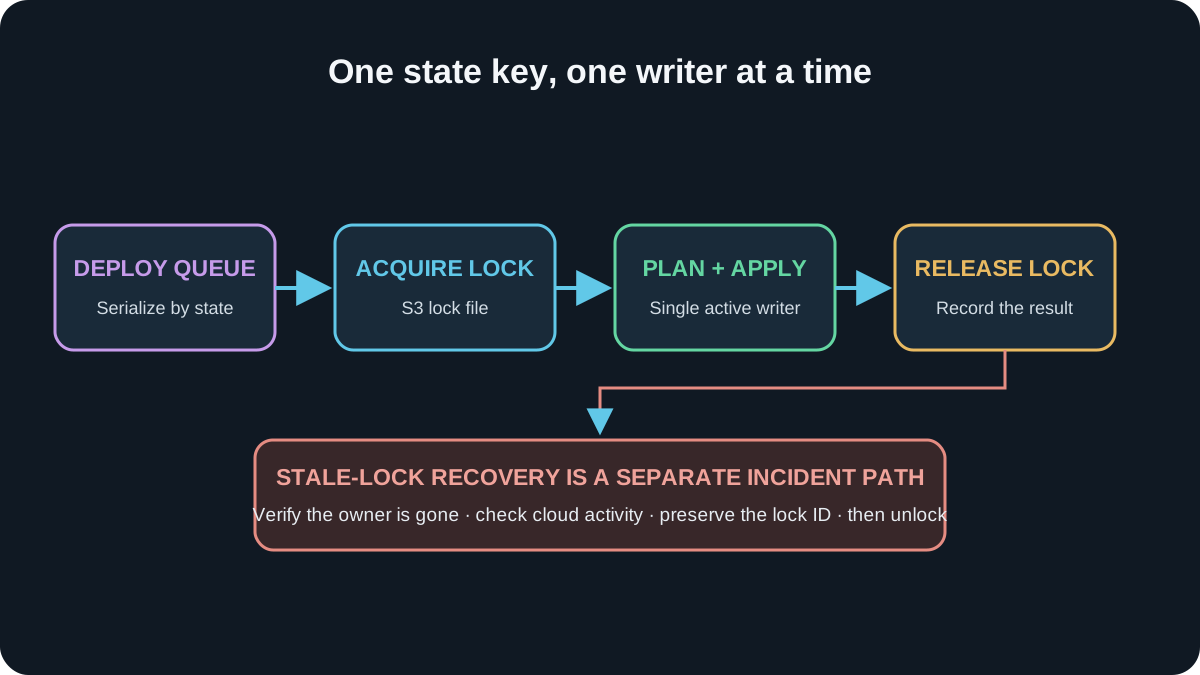
A failed runner can leave a lock behind. First verify that no apply is still running, identify the owning pipeline and lock age, and preserve the evidence. Force-unlock is an emergency action, not the normal way to make a pipeline green.
The resolution
We moved state operations behind one deployment queue, denied concurrent production applies, and added the run URL to the lock owner metadata. The pipeline now fails closed when a lock is active instead of encouraging repeated retries. A human can still recover a stale lock, but the action is documented and audited.
The remaining trade-off is speed. A second harmless change may wait behind a long apply. That is acceptable: serialized infrastructure is slower than concurrent corruption, and the queue makes the waiting visible.
- Check the CI job and cloud audit logs
- Confirm no active plan or apply owns the state
- Record the lock identity and reason
- Remove only the stale lock
- Run a fresh plan before applying anything
Make waiting safer than guessing
For the S3 native lock file shown above, pin Terraform 1.10 or newer across local workstations and CI. Use a bounded lock timeout for normal contention, and let the deployment queue serialize applies per state key. Recovery is different: confirm the owning run is dead, check CloudTrail for an in-flight change, record the lock ID, then unlock and create a fresh plan. Force-unlock is not a retry button; it removes coordination while the original writer may still be changing cloud resources.
A lock is not bureaucracy. It is the system admitting that two correct plans can still produce one incorrect environment when applied at the same time.
Why serialization is a reliability feature
Never delete a lock because a teammate says the pipeline is stuck. Infrastructure is not a group chat. Verify the writer is gone first.